

In this blog post

When is one store on Shopify Markets enough, and when should you keep separate instances? Four common market structures, how inheritance works, myths about Klaviyo and analytics, and where Markets still falls short in 2026, based on more than a dozen implementations.
A while ago we were talking to one of our clients about rolling their store out to yet another market, and about the cost of adding one more Shopify Plus instance. The base Plus fee covers your main store and 9 expansion stores; every store after that costs €250 a month or a share of revenue. This client already had more than 20 instances. A few minutes into the call it hit us: the store we had launched for them in early 2025 was built before the new version of Shopify Markets. A quick cost-benefit check (financial and operational) made it clear that rebuilding the store on Markets makes far more sense today.
Shopify Markets lets you sell to many markets from a single store. You define audiences, for example by country, region, customer type (B2B), retail location or sales channel, and show each of them a tailored version of your store: currency, language, domain, prices, product range, content, taxes and shipping.
Markets usually comes up with our clients in one of three situations:
- a migration to Shopify, where we need to decide how each market will be served,
- merging several instances to cut costs and simplify operations,
- cross-border expansion from one store into new markets.
The short version: Markets separates the shopping experience, while separate stores separate operations and team responsibilities. A different domain, currency or price list is not, on its own, a reason to spin up another store.
In this article I’ll walk you through how we decide whether a brand should run separate instances or one store on Shopify Markets.
TL;DR
- One store + Markets is the right call when you have one brand, want to manage everything centrally, and the differences between markets come down to currency, language, prices, product range, shipping and some of the content. Catalogs take care of different products and prices per market.
- Separate stores make sense when markets are run by separate teams and legal entities, or when you need different payment gateways, a completely different theme and visual identity, or full separation of apps and access.
- A hybrid model (for example a separate US store plus an EU store running Markets) is a common compromise when expanding across continents.
- Markets is available on every Shopify plan, with no limit on the number of country and regional markets. To get the full feature set (local currencies, local payment methods), you need Shopify Payments.
One caveat before we start. Writing about what Shopify can do is tricky, because this kind of content goes out of date fast. Sometimes I feel everything will change before I finish a single article ;) Given how much Shopify spends on R&D, that’s no surprise, and if you sell on Shopify, you can congratulate yourself on the choice. Everything below reflects the state of things in October 2026.
Shopify Markets only became a solid product in mid-2025
In my view, Shopify Markets has only been ready for serious implementations since mid-2025. Here’s why.
We’ve been working with Shopify at wecanfly since 2016. For years, the default setup for brands selling in several markets was a translation app plus currency conversion. Payment, however, had to happen in the store’s base currency. In other words, a customer browsed the store in British pounds, and the moment they went from cart to checkout, the pounds turned into euros. For many stores, that was a conversion killer.
So the workaround was to launch a separate store instance for each currency and sync inventory with an app, middleware or the ERP. Shopify Plus included (and still includes) 9 additional stores in the plan.
Shopify introduced Markets in 2021. What followed was a fair amount of confusion. In 2022 came Markets Pro for invited US merchants, which in practice was a service run by Global-e, Shopify’s partner, acting as merchant of record. In mid-2024 Markets Pro was renamed Managed Markets, and to this day it’s available only to merchants based in the US and some in Canada and the UK, not to companies in Poland or the rest of the EU. B2B and retail markets were added on top. Agencies and merchants struggled to keep up with all of this, and I remember that we actively advised clients against this immature feature, which kept changing far too often.
In 2025 Shopify rebuilt the Markets architecture. The new API shipped in version 2025-04, and all merchants were gradually moved to the new Markets by July 2025. That’s how we got the product we know today: markets defined by conditions (location, B2B customer group, POS location, sales channel), settings inherited from parent markets by submarkets, catalogs assigned to several markets at once, and per-market theme customization. I think a lot of brands missed or ignored this change.
If you launched your store before that date and have some kind of multi-market setup, you’re almost certainly on a more expensive, more complicated and outdated architecture.
Which multi-store problems Shopify Markets solves
The “old approach” comes with a few problems:
- Cost. You pay for every additional instance: Plus includes 9 stores, and each one after that is €250 a month. On top of that come separate app subscriptions in every store, payment setup, and agency or in-house time spent building each new market version.
- Syncing. Inventory, product information and prices have to be moved between stores, which often causes trouble.
- Day-to-day work. Design changes, content, translations and product information all have to be updated in each store separately. Every theme change means several deployments.
Shopify Markets fixes most of that:
- One place to manage the storefront. In the theme editor you pick a market and change only what needs to be different: section content, images and graphics (for example banners with text in the local language), hiding or adding sections and blocks. That goes well beyond translation. Per-market theme customization requires the Advanced plan or higher. Global theme settings (colors, typography) and Liquid templates can’t be changed per market, so it’s still one store, not several.
- Checkout and customer experience per market are easier to set up: currency, language, payment methods, duties and taxes.
- One admin: orders, customers, products and inventory in one place.
- No extra cost for additional stores or duplicate app subscriptions.
What Shopify Markets can do in 2026
- Unlimited markets. Markets is available on every plan, and you can create as many country and regional markets as you need.
- Market types: regional (countries and regions), B2B (company groups), retail (POS locations) and sales channels.
- Local currencies, languages and domains. Up to 20 languages on Basic, Grow and Advanced, up to 30 on Plus. A market can have its own domain (.de), a subdomain or a subfolder (/de-de), and Shopify adds hreflang tags automatically. Local currencies and local payment methods require Shopify Payments.
- Catalogs assigned to markets. A catalog decides which products customers in a market can see and buy, and sets their prices: a percentage adjustment for the whole catalog, fixed prices for selected products and variants, and the currency you set prices in. One catalog can be assigned to several markets, and each market can have its own. So a different product range per market doesn’t require separate stores.
- Per-market theme customization (content, images, sections, blocks) on Advanced and higher.
- Duties and import taxes for international orders, set per market.
- Submarkets inherit settings from their parent market: currency, catalogs, domains and languages, theme, duties and taxes, shipping, business entity and checkout. Any of these can be overridden in the submarket.
- Backup region: what a customer sees when they don’t match any active market. It replaced the old “primary market”.
- Shipping options per market. Shopify is gradually rolling these out to replace shipping profiles; for now they’re in early access for some stores.
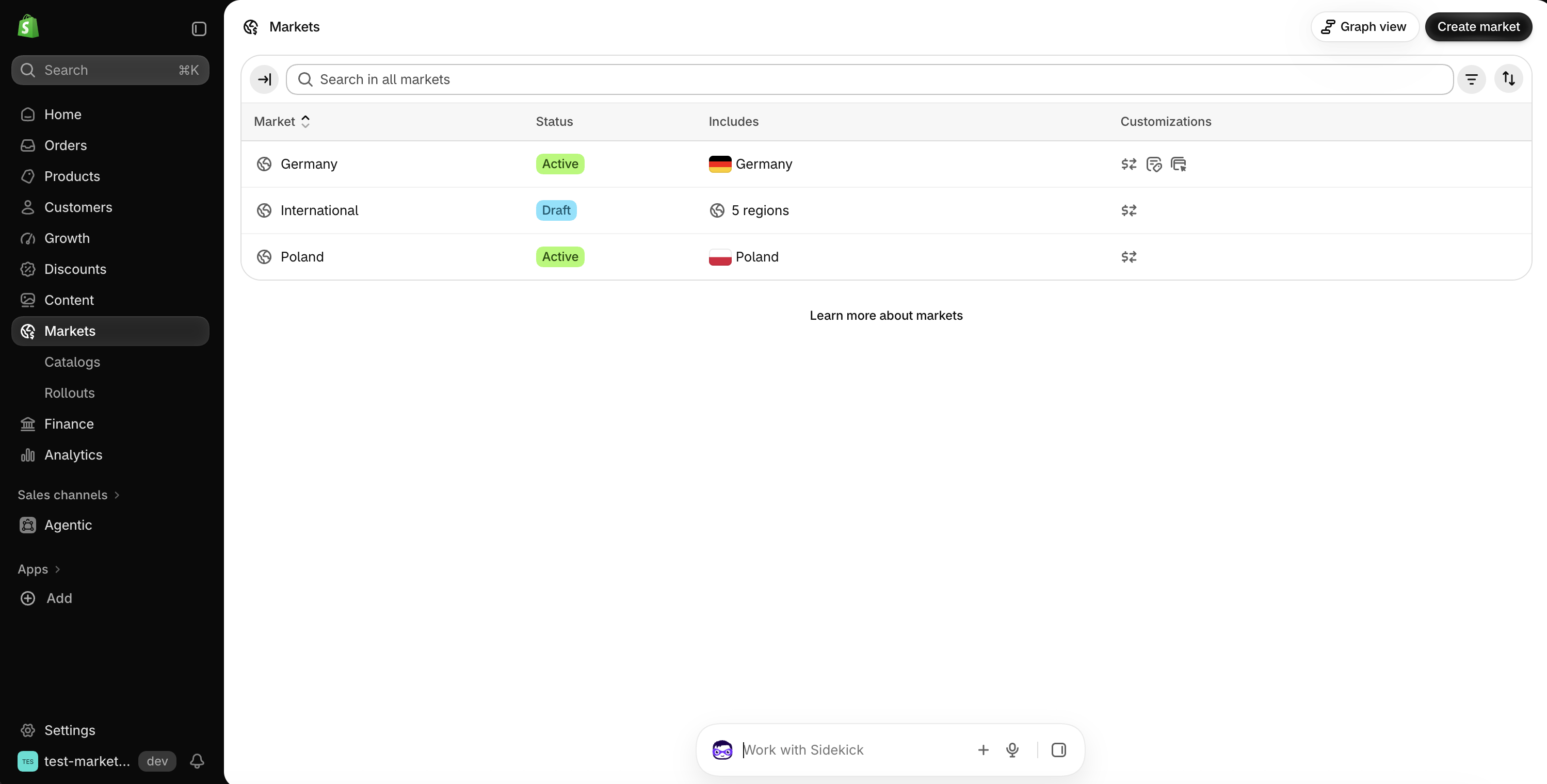
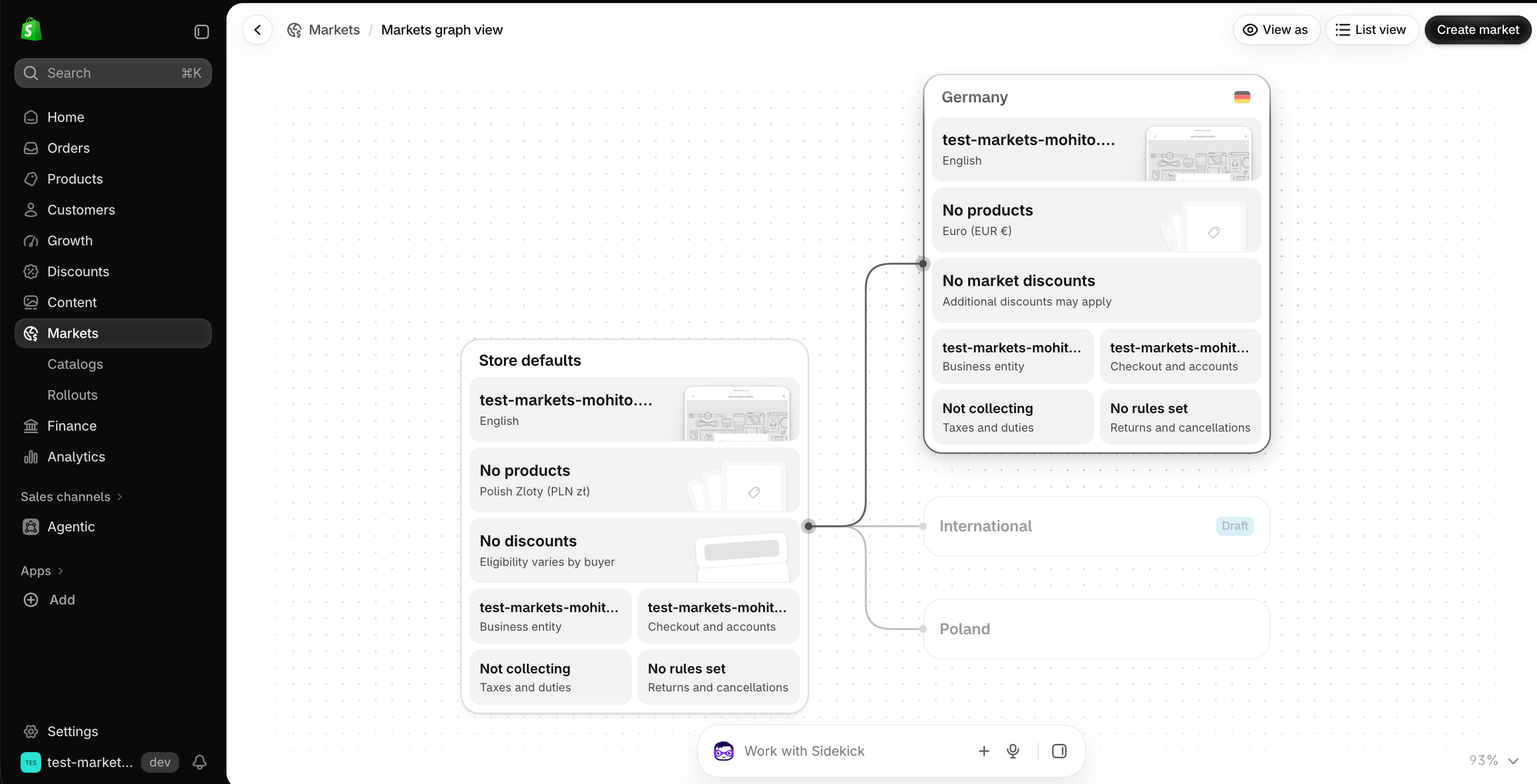
How brands structure their markets
It depends on how your organization is set up legally, operationally and strategically. Let’s take a common example: a brand that sells in Europe and wants to enter the US.
Option A: one store + Shopify Markets
This setup works best when you want central management, have a single brand and want to give every customer a consistent shopping experience. You have one shared setup and make exceptions where needed, for example separate currencies for the Nordic countries, different delivery methods in Poland, or a separate catalog with a different product range and prices for the US.
The structure could look like this:
- Store default settings: EUR currency, English language
- Europe (parent market: shared EUR prices, EU taxes)
- DACH (German)
- France (French)
- Nordics (SEK, NOK, DKK)
- Poland (PLN, different delivery methods)
- Rest of Europe
- USA (USD, separate price catalog, US duties and taxes)
- Europe (parent market: shared EUR prices, EU taxes)
Note: the new version of Markets no longer has a “primary market”. What used to be the primary market is now covered by the store’s default settings and the backup region, while a parent market plays the “parent” role for a group of countries, with submarkets inheriting its settings.
This setup also works for brands from outside Europe that want to enter the EU and keep multi-market operations simple at the start. In that case, it’s worth grouping countries by what they have in common: language, pricing, tax rates and logistics (for example, which fulfillment center serves them).
Oakywood works this way. We moved their store to Shopify Plus and built the new version of the site. Mateusz Haberny, Oakywood’s founder, said on our podcast that the store runs in every currency Shopify Payments supports and that switching between versions is simple for customers. Today the store is available in four languages: English, Polish, German and French.
Option B: a separate US store + an EU store on Shopify Markets
You keep two separate Shopify instances and turn on Markets in the European one.
- US store
- EU store (Markets)
- United Kingdom
- Germany
- Sweden
- Norway
- Poland
- and so on
This makes sense when you run different commercial strategies on the two continents: separate teams, separate marketing, different pricing and discount policies. Or when you operate in the US under a different brand or legal entity and need a completely different visual identity for the store.
The same model scales to more regions: separate stores for Europe, North America and Asia, each using Markets for its countries. That works when the regions run as independent businesses, with their own team, budget and release cycle.
Option C: country by country, with B2C and B2B in pairs
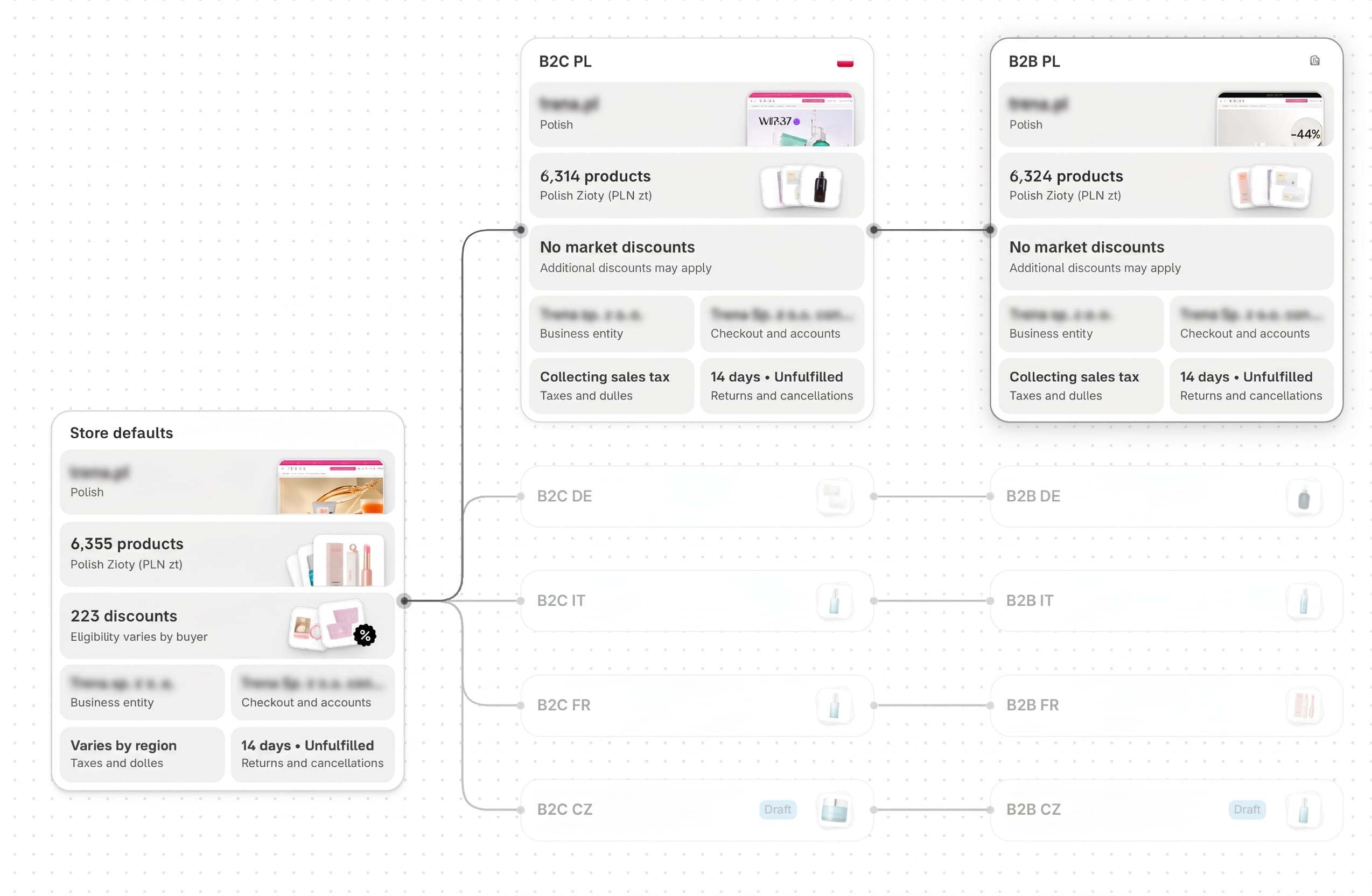
This is how one of our clients, who sells to both consumers and businesses in several EU countries, has set up their markets. Each country has its own B2C market, and that country’s B2B market sits under it as a submarket:
- Store default settings (one legal entity, shared discounts, returns)
- B2C Poland → B2B Poland
- B2C Germany → B2B Germany
- B2C Italy → B2B Italy
- B2C France → B2B France
- B2C Czechia → B2B Czechia (both still drafts, before launch)
The B2B market inherits language, currency, domain, taxes and shipping from “its” country and overrides whatever is different in wholesale: a catalog with wholesale prices and payment terms. That way, a change at country level (say, a new delivery method in Germany) applies to both B2C and B2B customers in that country right away.
This structure works when you expand country by country and business customers in each country buy under the same logistics and tax rules as consumers. You can prepare a new country in advance as a draft market and switch it on on launch day, like Czechia in the diagram.
If you’d rather have one set of B2B rules across all countries (one wholesale price list, the same payment terms), Shopify also supports the reverse: an “All B2B customers” market with countries underneath. A submarket can even have two parents, for example “B2B Germany” inheriting language and taxes from Germany and the price list from the B2B market.
Since April 2026, native B2B is also available on Basic, Grow and Advanced (up to 3 active B2B catalogs; unlimited on Plus), so this model is no longer reserved for Plus. Retail markets for physical stores (POS locations) can be added the same way; their own catalogs require POS Pro or Plus.
Option D: a separate B2B store next to the D2C store
- D2C store (brand.com) with Markets: Poland, Germany, USA…
- B2B store (for example wholesale.brand.com): companies and their locations, catalogs and trade terms
- PIM / ERP / integrations keep products and inventory in sync across both stores
A separate wholesale store makes sense when wholesale is a different sales process, not just a different price: the portal is closed to partners only, ordering works differently (for example quick orders from a list, large quantities), B2B is run by a separate team with its own integrations, or you need an independent release cycle. The cost is extra setup, apps and data syncing. A wholesale price list alone rarely justifies a separate store: B2B on Shopify is built around companies, their locations and the catalogs assigned to them, so one store can serve both retail and wholesale customers (option C).
How market inheritance works
When designing your structure, keep four rules in mind:
- Nothing set means look one level up. If a market doesn’t define a setting, it takes it from its parent, and if the parent doesn’t define it either, from the store defaults. Example: Germany without its own currency gets EUR from the “Europe” market, while Poland, which has its own currency, stays on PLN.
- Not everything is inherited the same way. Currency, and whether prices include tax, set on a submarket replace the parent’s value. Catalogs and domains work differently: the child gets the parent’s plus its own. The catch: a submarket’s own catalog doesn’t switch off the parent’s catalog, so product exclusions and prices have to be designed with all catalogs in mind at once. When a product has different prices in the catalogs of several parents, Shopify shows the lowest one.
- A customer can match several markets. Shopify then picks the most specific context: company location (B2B) first, then retail location (POS), then region, and finally the store defaults. With several parents, the most specific one wins.
- There’s no inheritance between stores. Two stores in the same Shopify organization don’t share market settings. Anything that should be shared has to be synced through a PIM, ERP or app.
Common concerns and myths
Below are a few issues that came up during our implementations, along with concerns clients brought to the pre-implementation analysis.
Klaviyo works better with separate instances and doesn’t support Markets
That’s no longer true. Klaviyo syncs Shopify Markets data: every product and variant for every region and language combination, with the currency, price and URL for that market. So your email templates can show products in the recipient’s language and currency. You turn the sync on with a single checkbox in Klaviyo’s Shopify integration. The limitation: Klaviyo syncs regional markets, not B2B or retail markets. With a large catalog, the first sync can take a few days.
Klaviyo’s guide to Shopify Markets walks through it step by step.
With Markets you can’t set up pixels or measure PPC campaigns per market
We hear this concern most often from performance marketing agencies. One client dropped Markets after consulting their PPC agency, which concluded that with a single store there’s no way to split campaigns and attribution by market.
In practice you can set it up however the client needs. Most often we give each market its own Google Analytics account, because that makes per-country reporting easiest. Technically it’s a simple bit of JavaScript: depending on the language version and market (locale), the store sends data to a different account. Campaigns and ad accounts can be split the same way.
Fixed-amount discounts
Overall, we don’t see major problems with Markets today. It’s a genuinely good solution. One small blocker is fixed-amount discounts: you set a €20 discount in the store’s base currency, and Shopify converts it into the customer’s currency at the current exchange rate at checkout. So a customer in Sweden doesn’t get a round number but the result of a conversion, down to the öre, and it changes from day to day. Workarounds: separate discount codes per market, a manual exchange rate for the market, or a multi-currency discount app. Percentage discounts don’t have this problem.
Mobile apps
A mobile app uses market data in much the same way as Klaviyo: it has access to the same information about markets, currencies, languages and per-market product catalogs. That lets you segment and target specific audiences, for example showing different products and prices to customers in different countries. At wecanfly we also build mobile apps for Shopify stores that support multiple markets.
Which apps work with Markets
We often hear that few apps work with Markets. That’s an oversimplification, but the concern is valid: every app needs to be checked for market support, because if one doesn’t handle Markets, costs start to pile up (workarounds, a second app, manual work). Apps with the Built for Shopify badge very often support multiple currencies and languages out of the box, but with a multi-market architecture it’s still worth confirming.
A few examples of apps we see at clients selling in multiple markets:
| App | What it does with markets | What to watch out for |
|---|---|---|
| Klaviyo | Syncs products with the language, currency, price and URL for each regional market | Doesn’t sync B2B or retail markets |
| Google & YouTube | Sends products to Merchant Center; you set the target country and language during setup | With multiple domains, check that the Merchant Center domain matches your product URLs |
| Littledata | Sends store orders to GA4 server-side | Confirm multi-currency and multi-market support with the vendor before rollout |
Before choosing an app, check its documentation to see whether it supports Markets, not just multiple currencies.
Where Shopify Markets still falls short
- Third-party apps with multiple legal entities. Markets lets you assign different business entities to markets, but external services don’t necessarily respect that. Example: an accounting or invoicing integration that always issues invoices with the details of the “main” entity.
- Local payment gateways, especially for cards. Local currencies in Markets require Shopify Payments, so in practice you’re tied to it, even if you’ve negotiated better rates with a local provider such as Przelewy24 in Poland. You can restrict payment methods per market (Checkout Blocks on Plus, apps like HidePay on other plans), but you can’t replace the Shopify Payments card fields at checkout with another provider; at most, you can hide them.
- Setup and day-to-day management. Everything sits in one admin, but not always side by side. When you add a new product, you have to remember its price in other currencies, adding it to the B2B catalog, and so on. With separate instances, mistakes like that are less likely.
- Taxes. In separate instances serving a single market, taxes are much easier to test and configure. With Markets we keep running into surprises. Recently Shopify support told us that the default “inherit from parent market” setting doesn’t inherit all tax settings. The documentation doesn’t mention this, so there may be more cases like it.
When Shopify Markets might not be the right choice
- Large, complex organizations (enterprises such as Reckitt): separate instances allow full separation of processes, apps and access for individual teams.
- Multiple brands. Each brand needs its own Shopify Plus agreement anyway, so Markets can’t replace separate stores for different brands.
- Different payment gateways in different markets, or markets where Shopify Payments isn’t available.
- Different systems per market: a separate ERP, warehouse and team in a given country that need to be integrated separately anyway.
Checklist: 7 questions to ask before you decide
| Question | Leans towards Markets | Leans towards separate stores |
|---|---|---|
| How many brands do you sell? | one | several |
| Are markets run by separate teams with their own budgets? | no, centrally | yes |
| Do product range and prices differ between markets? | not a blocker: per-market catalogs (availability, prices, currency) | not a reason for separate stores on its own |
| Do you need different payment gateways per market? | no, Shopify Payments is enough | yes |
| Are markets separate legal entities with their own accounting? | one entity, or several without complex integrations | yes, with separate systems |
| How different should the storefront look? | different content, images and graphics, hidden or added sections per market (Advanced plan or higher) | a completely different theme, for example because of the brand’s character or unique business processes |
| Is wholesale a different process from retail (closed portal, different ordering)? | no: B2B in the same store as D2C (blended store) or as a separate B2B market | yes: a separate B2B-only store (dedicated store) |
How we approach it at wecanfly
We’ve delivered more than a dozen Shopify Markets implementations: during migrations, when merging instances and when entering new markets. Each one starts with a pre-implementation analysis in the form of a workshop. We map out the markets (countries, currencies, languages, B2B, physical stores), check which apps and integrations need to support them, and compare the cost of running the current instances with the cost of moving to Markets. Only then is it clear whether one store is enough or whether it’s better to keep several.
If you’re wondering whether your stores could be merged into one, let’s talk.