


In this blog post

Why your GA4 and Shopify numbers never agree, how server-side tracking with Littledata fixes it, and how to put the recovered data to work in Klaviyo, Google Ads, and Meta.
Every Shopify merchant we work with eventually asks the same question: "Why does Google Analytics show different revenue than Shopify?"
It usually starts innocently. Someone compares last month's revenue in GA4 against the Shopify admin and finds a gap of 15–30%. Sessions don't match either. Half the purchases in GA4 sit under direct / (none), which is analytics-speak for "we have no idea where this customer came from." And the paid channels that are driving growth look mysteriously weaker than the ad platforms claim.
We kept getting these questions from clients, and for a while we didn't have answers we were fully satisfied with. So we dug in — into how Shopify's checkout actually reports data, into what breaks between the browser and GA4, and into Littledata, a tool we now actively recommend. This article is the result: what the problem really is, what Littledata does about it, and — most importantly — what you can do with the fixed data in Klaviyo, Google Ads, Meta, and GA4 itself.
Why Shopify and GA4 will never agree on their own
The gap between Shopify Analytics and GA4 isn't a bug you can fix with better configuration. It's structural. A few of the biggest reasons:
The checkout goes dark. A typical session starts in the browser: page views, product views, add-to-carts all fire client-side and reach GA4. But the moment a customer enters Shopify's checkout, everything moves server-side. For privacy reasons, Shopify's servers prevent the browser from sending data to third-party tools — GA4 included. The most valuable part of the funnel is exactly where standard tracking loses sight of the customer. Worse, those server-side events often arrive in GA4 as new sessions with no source attached, which is why so much checkout revenue lands in direct / (none) or (not set).
Browsers and ad blockers eat your tags. Safari's Intelligent Tracking Prevention caps cookie lifetimes at 7 days, Brave blocks trackers outright, and ad blockers stop the GA4 and Google Ads tags from firing at all. Even on a single device, many stores only ever report around 60–70% of their actual conversions through client-side tags.
Cross-device journeys break the thread. A customer clicks an Instagram ad on their phone, then buys on their laptop that evening. To client-side tracking, those are two unrelated people. Google's own research with Boston Consulting Group found that roughly 70% of cross-device conversions go untracked without enhanced measurement.
Consent adds a legal gap. Under GDPR, tracking can only start after the user consents. Users who decline are invisible to GA4 — a gap no tool can (or should) fully close.
And even the sessions are counted differently. Shopify doesn't "sessionize" server-side events the way GA4 expects, so add-to-cart-onwards activity can balloon Shopify's session counts while GA4 undercounts conversions. You end up with two dashboards, two versions of reality, and a team that trusts neither.
The practical consequence is worse than messy reports. Your marketing algorithms learn from incomplete data. Google's Smart Bidding and Meta's delivery algorithms optimize toward the conversions they can see. If 30% of conversions are invisible, the algorithm systematically undervalues the campaigns, audiences, and keywords that actually drove them — and quietly shifts your budget toward whatever happens to be tracked best, not what performs best.
What Littledata actually does
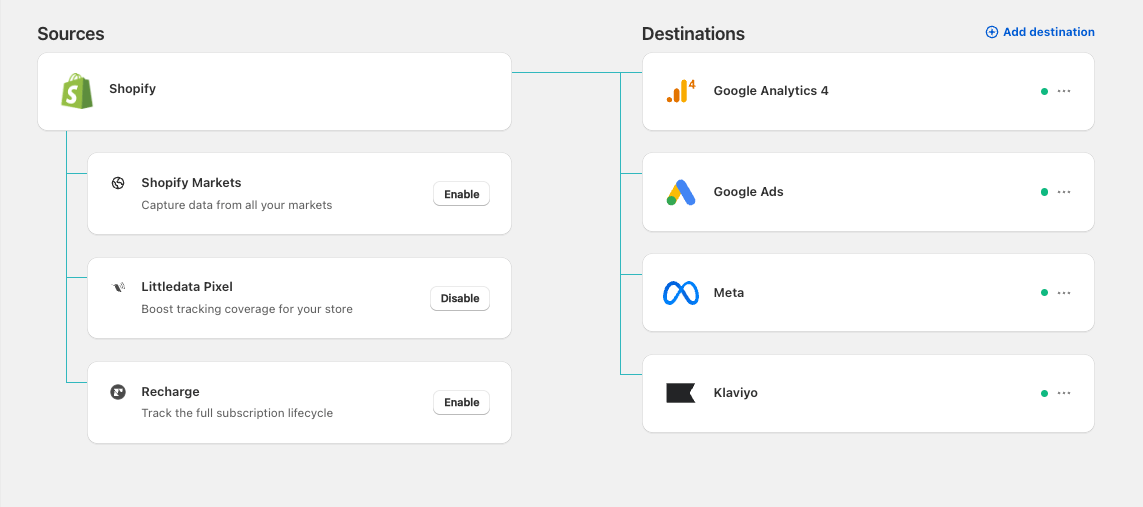
Littledata is a Shopify app that replaces fragile browser-based tracking with a hybrid model: light client-side tracking for browsing behavior, plus server-side tracking for everything that matters commercially.
While browser-based tracking is like an imperfect net, where essential data points can escape through holes created by ad blockers and browser privacy features, server-side tracking operates differently. It means the data doesn't travel through the customer's browser at all. Instead of attempting to containing and count data in the browser (the net), we capture it directly. When an order is placed, Shopify's server tells Littledata's server, which passes the event straight to your destinations — GA4, Google Ads, Meta, Klaviyo, TikTok, Pinterest, and others. This ensures no data points slip away, because there is no imperfect net in the browser to rely on."

Concretely, Littledata:
- Tracks the full checkout funnel server-side —
begin_checkout,add_shipping_info,add_payment_info,purchase,refund, and even post-purchase upsells — events that standard setups lose entirely. - Stitches sessions together. The client-side session is identified, and all subsequent server-side events are tied back to it. GA4 receives properly "sessionized" data, so a purchase is attributed to the Facebook ad that started the journey instead of
direct / (none). - Enriches every event with customer context: lifetime revenue, purchase count, last transaction date, order tags (affiliation), and Shopify Market — sent as custom dimensions you can segment on.
- Tracks subscriptions properly. Recurring renewal orders happen entirely on the server with no session at all; Littledata captures them and, via its Attribution Boost feature, attributes each renewal back to the channel that acquired the subscriber in the first place.
- Stays GDPR-friendly by design. Littledata integrates with Shopify's Customer Privacy API and Google Consent Mode v2, so consent choices are respected across the pipeline.
That's the plumbing. Now the interesting part: what changes in each marketing platform once the data is complete.
Klaviyo: catching the shoppers your flows never see
Around 70% of ecommerce shopping carts are abandoned — Baymard Institute's meta-analysis of 50 studies puts the average at 70.22%, a figure that has barely moved in a decade. Abandonment flows in Klaviyo are how most Shopify brands claw that revenue back. But there's a catch few merchants realize: a Klaviyo flow can only fire if Klaviyo's client-side tracking saw the trigger event and could match it to a known profile. Every shopper hidden by an ad blocker or Safari's privacy features is a shopper your abandoned cart email never reaches.
Littledata sends server-side versions of the key events to Klaviyo — Viewed Product – Littledata, Added to Cart – Littledata, Checkout Started – Littledata — as drop-in replacements for the native triggers, with compatible schemas so you don't need to remap anything in your templates. Combined with enhanced identity resolution (linking anonymous sessions to profiles that opted in earlier), your flows simply see more people. According to Littledata's data, brands switching to these triggers typically see around 40% better flow performance. Checkout abandonment is a particularly strong case: Littledata can recognize a returning customer entering the checkout before they type their email address, which native tracking cannot — reaching up to 30% more shoppers with that flow alone.

The elegant part: you can A/B test the claim
Littledata's case studies report abandonment flow revenue increases from +27% to +128% (One Bone +128%, UCAN +110%, Smith Teamaker +95%). Healthy skepticism toward vendor case studies is fair — which is why the validation setup Littledata itself recommends is worth copying:
- Clone your existing flow (browse, cart, or checkout abandonment) and set the Littledata event as the clone's trigger.
- Give the original flow priority by adding profile filters to the clone: e.g. for checkout abandonment, only enter profiles where the native
Checkout Startedfired zero times in the last hour, andPlaced Orderzero times since starting the flow. - Run both in parallel. The original flow catches everyone it always caught. The Littledata clone catches only the people native tracking missed.
Every email sent — and every dollar earned — by the cloned flow is pure incremental uplift, measured on your own store with your own traffic. No trust in vendor benchmarks required. Once you've seen the numbers, you pause the original flow and let the Littledata triggers take over.
One more practical gem: Littledata attaches a checkout_url cart permalink to the Added to Cart event. Your abandoned cart emails can link straight into a pre-filled checkout — {{ event.extra.checkout_url }}?payment=shop_pay&discount=15off even opens it in Shop Pay with a discount applied — and it works across browsers and devices, where Klaviyo's own checkout link often breaks.
Google Ads: feeding the algorithm the whole picture
There are two conventional ways to get Shopify conversions into Google Ads: the Google & YouTube channel app (client-side tag), or importing key events from GA4. Both used to work well. Both now leak — for all the reasons above: ad blockers, ITP, consent, cross-device journeys.
The damage compounds in a way that's easy to miss. A customer clicks your ad, visits the store, and buys — but the conversion never reports back. Google's Smart Bidding, which sets your bids in every single auction using machine learning, now believes that click was worthless. Multiply by thousands of clicks and the algorithm is being trained on systematically wrong data.
The invisible-ROAS trap
Here's the scenario that convinced us this matters, in round numbers:
| What's real | What you see (70% tracking) | |
|---|---|---|
| Campaign spend | €10,000 | €10,000 |
| Conversions | 100 | 70 |
| Revenue (AOV €500) | €50,000 | €35,000 |
| ROAS | 5.0x | 3.5x |
Same campaign, same customers, same money in the bank. But at a reported 3.5x, plenty of marketing managers would cut the budget — or kill the campaign. That's the hidden cost of bad attribution: not just suboptimal bidding, but confident human decisions made on wrong numbers.
What Littledata does differently
Littledata sends conversions directly from Shopify's server to Google Ads via the conversions API, enriched with hashed first-party customer data for Enhanced Conversions matching. Nothing travels through the browser. In your account, it creates four new conversion actions:
- Purchase – Littledata
- New customer purchase – Littledata
- Returning customer purchase – Littledata
- View item – Littledata

The one configuration step that matters: set the Littledata purchase as your primary conversion and demote the old ones to secondary. Primary conversions are what Smart Bidding optimizes toward; secondary ones are observation-only. Skip this step and you've bought better data but the algorithm is still eating the old diet.
The published benchmarks are consistent: server-side tracking and Enhanced Conversions recover roughly 15–30% of previously invisible conversions, and once Smart Bidding retrains on the larger dataset, the downstream revenue lift is typically 8–15% — Littledata's own docs call ~10% a conservative default. For context, ASOS saw an 8.6% Search sales lift from Enhanced Conversions alone, with a tracking setup that was already far above average.
The remarketing bonus
Because Littledata pushes customer-level custom dimensions into GA4 (purchase_count_ld, lifetime_revenue_ld, last_transaction_date_ld, affiliation/order tags), you can build GA4 segments — and from them, Google Ads audiences — that native setups simply can't express:
- New customers vs. returning vs. never purchased (
purchase_count_ld= 1, >1, 0) - Added to cart but never started checkout
- Bought once, never came back (winback campaigns)
- Lifetime revenue above X — your VIPs, or a seed for exclusion lists
- Subscribers, via order-tag affiliation — e.g. exclude active subscribers from acquisition campaigns
- First visited during BFCM — for seasonal reactivation
The full list of server-side events and parameters is in Littledata's documentation.
Meta: from "any purchase" to the purchases you actually want
Meta's Conversions API (CAPI) is an extension of the Meta Pixel, not a replacement — a server-side channel that keeps feeding Meta accurate events when the Pixel gets blocked. Meta scores the quality of this feed as Event Match Quality (EMQ): how well server events can be matched to real Facebook/Instagram accounts, on a scale to 10. Higher EMQ means better targeting, better lookalikes, more accurate ROAS reporting, and ultimately lower acquisition costs — you're showing ads to the right people.
Shopify does ship a native Meta integration, but it's shallow: no server-side Add to Cart, no subscription tracking, limited checkout granularity. Littledata's CAPI connection fills those gaps and adds the same customer-intelligence layer as on Google: New Customer Purchase and Returning Customer Purchase as separate events (enable them in Littledata, then verify them once in Meta Events Manager).
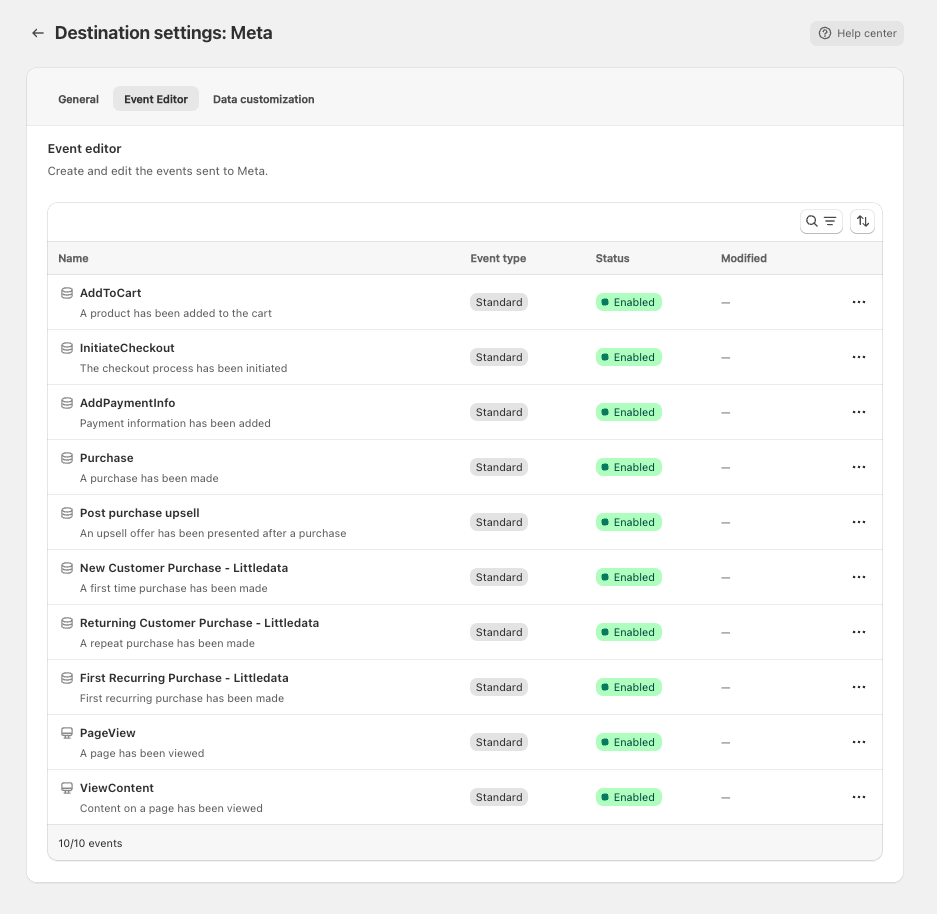
That unlocks three plays worth knowing about:
1. Pay different prices for different customers. Set New Customer Purchase as the optimization goal at the ad set level and Meta's algorithm actively hunts for people who have never bought from you. Your CPA will rise — acquiring strangers is more expensive than re-converting fans — but you gain certainty that your acquisition budget buys acquisition, not easy conversions from returning customers who would have bought anyway.
2. Optimize for value, not just volume. Left to optimize for "any purchase," Meta tends to find bargain hunters — the cheapest conversions available. Because Littledata passes the value of every repeat purchase back to Meta, the algorithm learns what your best customers look like and finds more of them. You stop bidding on orders and start bidding on customers.
3. See the real LTV of your creatives. If you sell subscriptions (supplements, cosmetics, meal kits), Littledata sends every renewal to Meta — even though renewals happen entirely in the background with no site visit — and Meta attributes the value to the original ad that acquired the subscriber. A campaign that looks unprofitable on first-purchase ROAS (€100 to acquire, €80 first order) can reveal itself as your best performer once €400 of lifetime value is visible against it.
One honest caveat: even with identical data flowing into both platforms, GA4 and Meta will still report different conversion counts. They use different attribution models and windows. That's not a tracking failure — it's two referees applying different rulebooks to the same game. Pick your source of truth for cross-channel decisions (we'd argue for GA4, fed by server-side data) and use each ad platform's numbers for in-platform optimization.
GA4: the reports that suddenly become possible
Fixing the data feed is one thing; the payoff is what GA4 can now tell you. A few reports that go from "unreliable" to "decision-grade" with complete server-side data:
Customer lifetime value by channel. Littledata's custom dimensions let you build LTV reports segmented by acquisition source — so you can see that, say, organic customers are worth 2x paid-social customers over 12 months, and set channel budgets (and target CPAs) accordingly.
Subscription revenue attribution. Recurring renewals are tied back to the original acquisition channel. You finally see which campaigns produce subscribers, not just first orders.
Net revenue, not gross. Because Littledata listens to Shopify's admin webhooks, refunds appear in GA4 as negative revenue events. Products with high return rates stop flattering your reports — and your ad spend decisions.
Product-level conversion funnels. View → add-to-cart → checkout → purchase rates per SKU, built on complete checkout data. This is how you find the products that deserve ad spend and the product pages leaking money.
Which first products create your best customers. Cross-referencing first-purchase items with subsequent LTV answers the question "which product should I actually be running ads for?" — and the answer is often a gateway product, not your bestseller.
Clean source/medium for checkout events — including mapping by order tags, payment gateway, or sales app (Recharge, PayPal, TikTok Shop), so channel reports reflect reality end to end.
So is it worth the money?
Littledata is a subscription, priced by monthly order volume: a Flex tier from $0.35/order for small stores, Scale from $159/month (1,500 orders included), and Plus from $792/month with managed onboarding (current pricing). All plans include all destinations and a 30-day free trial.
The honest way to evaluate it is against recovered revenue, and the framework is simple:
ROI = attributed revenue × expected lift ÷ Littledata cost
A simulation: what a typical store stands to gain
Let's make it concrete. Take a mid-size Shopify store doing €150,000/month at a €100 average order value — 1,500 orders — with a typical channel mix: €50,000 attributed to Google Ads, €40,000 to Meta, and €8,000 coming from Klaviyo abandonment flows. Now apply the benchmarks from this article: +10% on Google Ads (the documented conservative default), +40% on abandonment flows (Littledata's own figure), and — since the Meta CAPI lift is less publicly benchmarked — a deliberately cautious +5% on Meta, half of what the same mechanism delivers on Google.
| Channel | Attributed revenue / month | Expected lift | Incremental revenue |
|---|---|---|---|
| Google Ads | €50,000 | +10% | €5,000 |
| Meta Ads | €40,000 | +5% | €2,000 |
| Klaviyo abandonment flows | €8,000 | +40% | €3,200 |
| Total | €10,200 / month |
At 1,500 orders/month this store fits Littledata's Scale plan at $159/month (~€150). That's roughly €10,000 of incremental monthly revenue against €150 of cost — the subscription pays for itself before lunch on the first day of the month. And even if you assume only a third of the modeled lift materializes on your store, you're still north of a 20x return.
Two honest footnotes to this simulation. The lifts aren't perfectly additive — a recovered shopper who converts through an abandoned cart email won't convert a second time through a retargeting ad, so channels partly compete for the same reclaimed revenue. And every store's leak profile differs: heavy mobile traffic, EU consent rates, and cross-device behavior all move the numbers. Treat the table as directional, then measure your own lift using the methods below.
Three rules of thumb from our experience:
- The more you spend on paid, the faster it pays for itself. The value compounds through Smart Bidding and Meta's algorithm; if you spend little on ads and email, the calculus is weaker.
- Subscription brands are the strongest fit. Renewal tracking and LTV attribution address problems native tracking can't touch at any price.
- Measure it yourself. Clone your Klaviyo flows (as described above) for a clean incremental read on email. For ads, compare 30 days of attributed revenue before and after, controlling for seasonality and budget changes. If the numbers don't materialize on your store, the trial costs you nothing.
The bottom line
The GA4-vs-Shopify data gap isn't a reporting nuisance — it's a tax on every marketing decision you make. Algorithms trained on 70% of the truth spend your budget accordingly, and managers looking at understated ROAS cut the wrong campaigns.
Server-side tracking closes most of that gap, and Littledata is the most complete implementation of it we've found for Shopify: one pipeline feeding GA4, Google Ads, Meta, and Klaviyo with the same complete, consent-compliant data. It won't make every dashboard agree to the decimal — attribution models differ, and consent gaps are here to stay — but it moves you from arguing about whose numbers are right to acting on numbers you can trust.
If you're running a Shopify store and your GA4 and Shopify reports disagree by more than a few percent, that gap is where your marketing budget quietly leaks. We're happy to help you find out how much — whether that's a tracking audit, a Littledata implementation, or making sense of the data once it's flowing.
wecanfly is a Shopify agency and Littledata partner. We help ecommerce brands migrate to Shopify and grow on it — including getting their analytics to a state where growth decisions can actually be trusted.