


In this blog post
.webp)
Online furniture catalogues often come equipped with clever configurators that can help users make up their mind faster when shopping. Depending on how advanced the tool is, it gives them a much clearer sense of the furniture’s dimensions and allows them to tailor it perfectly to their interior. They can simply click through the options to start designing their room, as well as create and customise designs in just a few minutes. Using one can feel like co-designing a dream piece — and in a way, it is! But for a configurator to be truly delightful, it should tick a few important boxes: it shouldn’t be annoying or tiring to use, it should work smoothly, and make one feel like they’re in control.
✏️ This article was created in collaboration with Aleksandra Drozd, UX/UI Designer at WeCanFly, who gathered the best examples from the industry and shared her insights on each solution.
Updated in October 2026: we rechecked every configurator on the list, added what we learned building configurators for our own furniture clients, and explained how configurators work on Shopify today.
What is a furniture configurator?
A furniture configurator is a tool on a product page that lets shoppers build their own version of a piece: choose modules, dimensions, fabrics, colours or legs, see the result on screen and get the price before adding it to the cart. The better ones also show the piece in the shopper's room with augmented reality (AR) and let them save or share the design.
Configurators matter most for modular and made-to-measure furniture: sofas built from modules, wardrobes, shelving, beds and desks. Shoppers buy these rarely, the products are expensive and heavy to send back, and the main fear is that the piece won't fit the room. A good configurator answers that question before the order.
A note before the list: three of the seven brands below are our clients (vetsak, Optisofa and Oakywood). For those, we say what our role in the project was. The other four are configurators we simply admire.
The 7 configurators at a glance
We checked each configurator on the live site on October 30, 2026. In the AR column, we only mark the configurators where we found a "view in your room" button.
| Brand | What you configure | How you start | AR |
|---|---|---|---|
| vetsak | Modular sofas | 6 preset shapes or a blank canvas | – |
| Tylko | Storage, desks and wardrobes; sofas are a newer category | Any product page | – |
| Benet | Beds, sofas, corner sofas, armchairs | Dedicated 3D configurator pages | Yes |
| Optisofa | Modular sofas (Cloud, Hug, Lazy, Slay) | 4 layouts or start from scratch | Yes |
| Oakywood | Desks, including standing desks | Product page, then "Customize My Desk" | – |
| Flexmeble | Made-to-measure wardrobes, cabinets and kitchens | Any product page | – |
| IKEA | PAX wardrobes | Separate online planner | – |
Understanding Modular Furniture
Modular furniture should be flexible and adaptable, allowing users to create customised designs that perfectly fit their space. These systems typically consist of a range of interchangeable units, such as shelves, drawers, and cabinets, that can be combined in various ways to create a unique and functional interior.
Modular furniture also makes it easier to update the space as one’s needs change: instead of replacing an entire system, one can simply add, update or replace individual units.
Okay, enough of theory! Here’s a roundup of seven fantastic furniture configurators that will help you turn shopping into designing.
1. vetsak: Pre-set Options or a Blank Canvas?
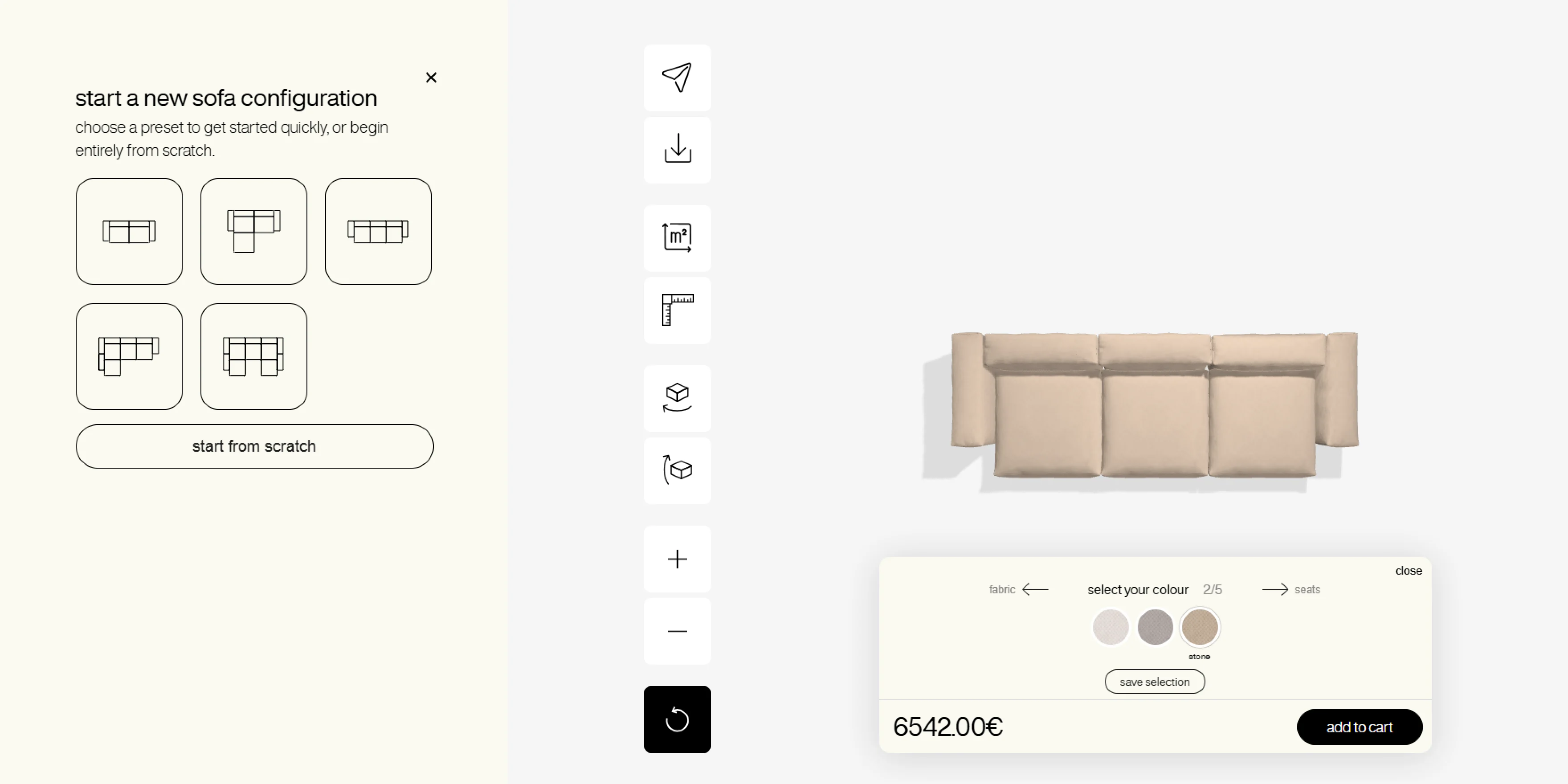
vetsak is known for its distinctive modular sofas, and its configurator is the heart of the store: it has its own place in the main navigation, right next to “Shop”.
When you open it, you pick one of six preset shapes to kickstart your sofa adventure (1-, 2- and 3-seat sofas, an L-shape on either side and a U-shape) — or, if you’re feeling bold, you start entirely from scratch. This is a smart design choice, catering both to those who like a bit of guidance and to free spirits who want complete control.
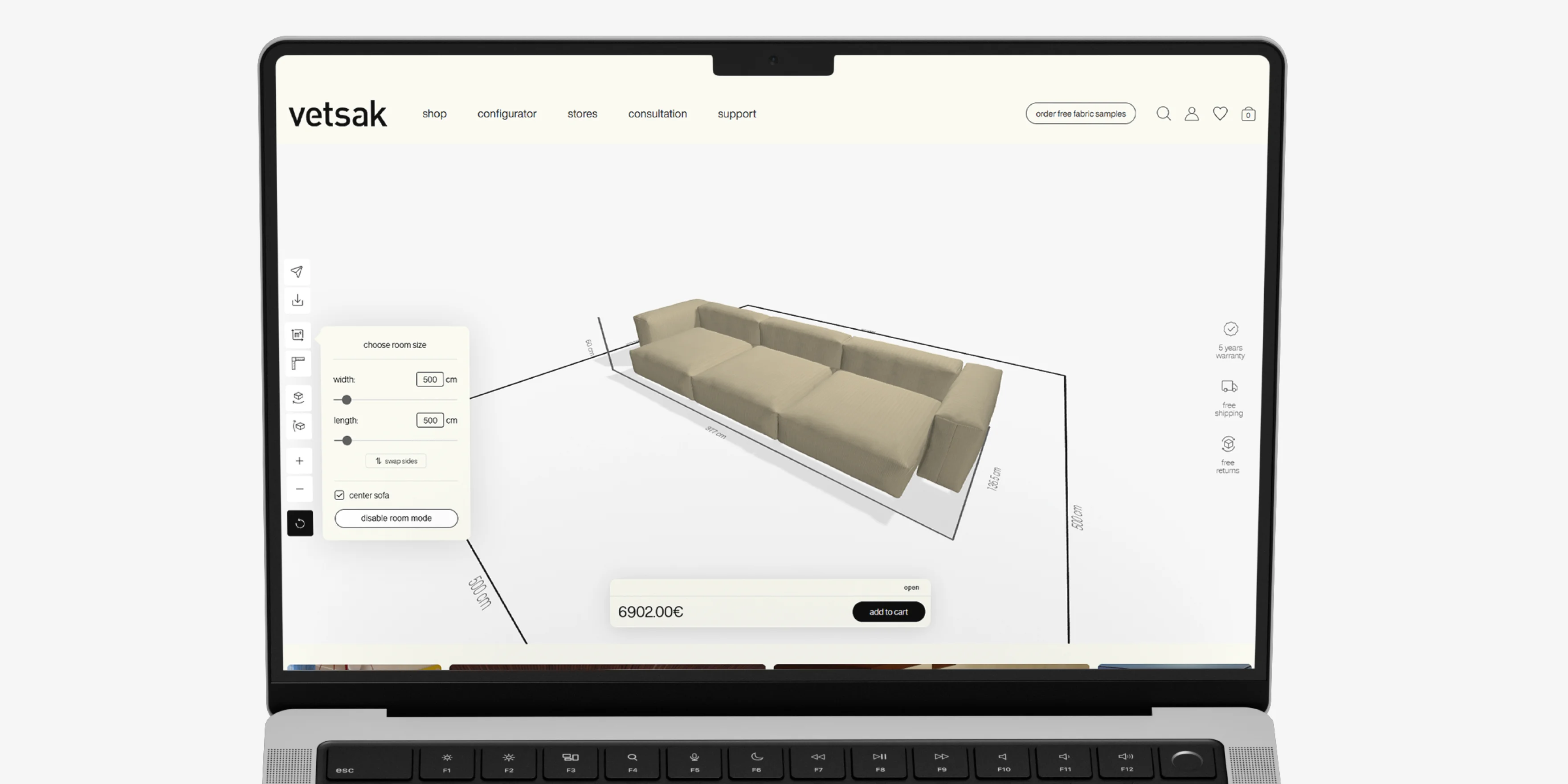
Flexibility is key here: you can switch the shape at any time, add and rearrange modules, and watch the price update as you go, with “Add to cart” always in view. To make the fabric decision easier, vetsak also sends free fabric samples.
Our role: for vetsak we designed (UX/UI) and developed a Shopify Plus store for several European markets, including the product page and the 3D configurator, which was built with Vazco in React and is the one shoppers use on vetsak.com today. The vetsak case study has the details.
2. Tylko: Customise… Everything!
.webp)
Tylko’s online shop offers sideboards, bookcases, wall storage, desks, TV stands, wardrobes and chests of drawers, and every one of them can be customised right on the product page. Since our first review, Tylko has also added modular sofas.
On a product page, you pick a style, drag sliders for width and height, choose the depth and whether the piece stands on feet or a plinth, and pick from a range of colours and finishes — all with immediate visual feedback and the price shown at the top of the panel.
You can save a design for later, and if you’re unsure about colours, you can order material samples before you commit.
3. Benet: Create Your Dream Bed
.webp)
Benet deserves a shout-out even though their configurators aren’t packed with hundreds of options. They offer 3D configurators for beds (four types), sofas, corner sofas and armchairs, grouped under a separate “Configure in 3D” menu.
For the BEDBenet models, you work through numbered steps: bed size, headboard quilting, headboard finish, the back of the headboard and the fabric, with the price shown below the options.
Benet’s configurator is quick to respond, and here’s a bonus: a “See it in your room” button lets you view your creation in AR without needing an account. The configurator runs on Mimeeq, the same 3D platform Optisofa uses.
4. Optisofa: Intuitive Configurator with AR
.webp)
Optisofa’s planner lets you build a modular sofa from one of four families: Cloud, Hug, Lazy and Slay. You start from one of four layouts (sofa, sofa with chaise, L-shaped or U-shaped) or from scratch, then add and arrange seats, backrests and armrests in the preview.
Separate tabs for modules, fabric and extras keep the options manageable. A toolbar under the preview includes a “View in your room (AR)” button, and the price and “Add to cart” stay at the bottom of the screen. Each design gets its own link, so you can share it or come back to it later.
Prefer to skip the customisation? You can also buy pre-configured sofas, just like at vetsak.
Our role: we moved Optisofa from WooCommerce to Shopify, designed the store from scratch and implemented a 3D and AR configurator built by Mimeeq. In 2023 that store was headless. When a redesign was due, the store went back to a custom Shopify theme (Liquid): we designed the new store in 2025 and it launched in 2026. Everything the client wanted could be built on Liquid, including the configurators: the store kept its Mimeeq integration and moved its modular sofa planner to The Planner Studio. More about what that means for other stores below.
5. Oakywood: A Functional Workspace

Oakywood offers a standout customisable product: solid wood desks, including standing desks that let you switch between sitting and standing positions.
The product page covers the common choices: wood finish, size (from 120×60 to 170×85 cm, with a cm/inch switch), leg colour and recommended add-ons. For anything beyond that, the “Customize My Desk” button opens a customiser with, as Oakywood puts it, 1000+ options, including custom sizes. The estimated shipping time sits right below the button.
Our role: we ran a design and development workshop with Oakywood, redesigned the store as it moved from Shopify to Shopify Plus, and built the OakyBlocks bundler and a product configurator with AR, together with Precismo. Mateusz Haberny, Oakywood’s founder and CEO: “We implemented several innovative solutions – such as a product configurator, price transparency, and the ability to present products in augmented reality, among others.”
What it changed for Oakywood. Mateusz Haberny talked about the configurator in our podcast. With the new store, Oakywood launched four configurators: two types of adjustable desks, desk shelves and made-to-measure desk mats, plus AR models that shoppers can view on their phones. Personalised products went from a handful of one-off custom orders before the new store to roughly 30–40% of what Oakywood makes, and the team keeps adding options that customers ask for, such as a cable grommet placed anywhere on the desktop. He also explained why the 3D view matters so much for wood (translated from Polish): “It's especially important with wooden products, products that are expensive, to see what the final product will be. It will never be one to one. Every wooden product is individual; the wood grain is always different.”
6. Flexmeble: Easy to Use, Cleverly Designed
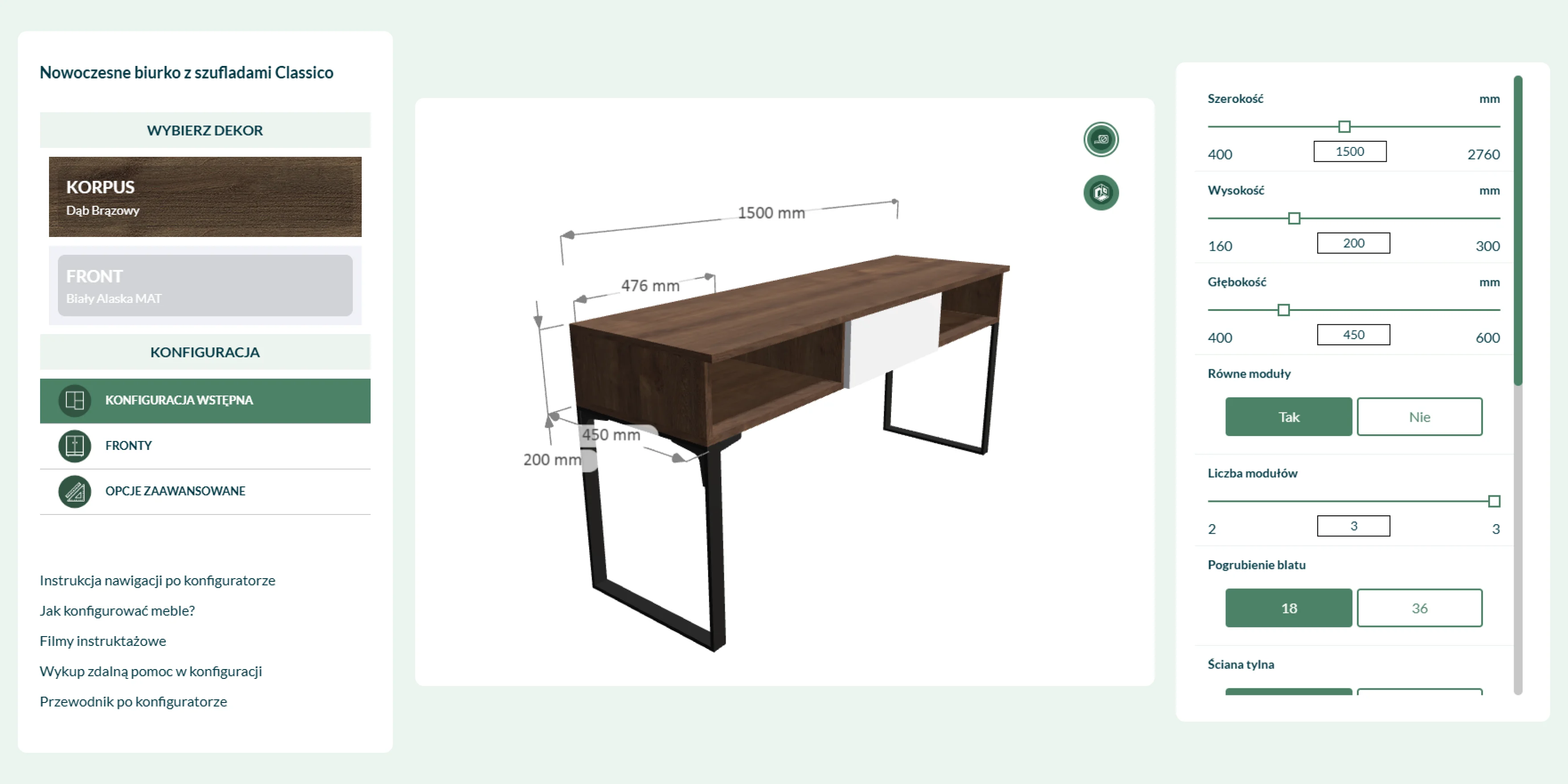
Like Tylko, Flexmeble offers configurators for its made-to-measure products, from wardrobes and chests of drawers to kitchen and bathroom cabinets. On a wardrobe, for example, you set the height, width and depth of each section, the number of shelves, the direction the doors open, the hinges and drawer runners, and the colours.
What makes it accessible is the help around the tool: a “how it works” guide, assembly instructions, live chat, material samples and even remote help with configuring a piece. That makes it friendly for newcomers who might otherwise feel overwhelmed, while still offering clarity and efficiency for more experienced users.
7. IKEA: The Classic
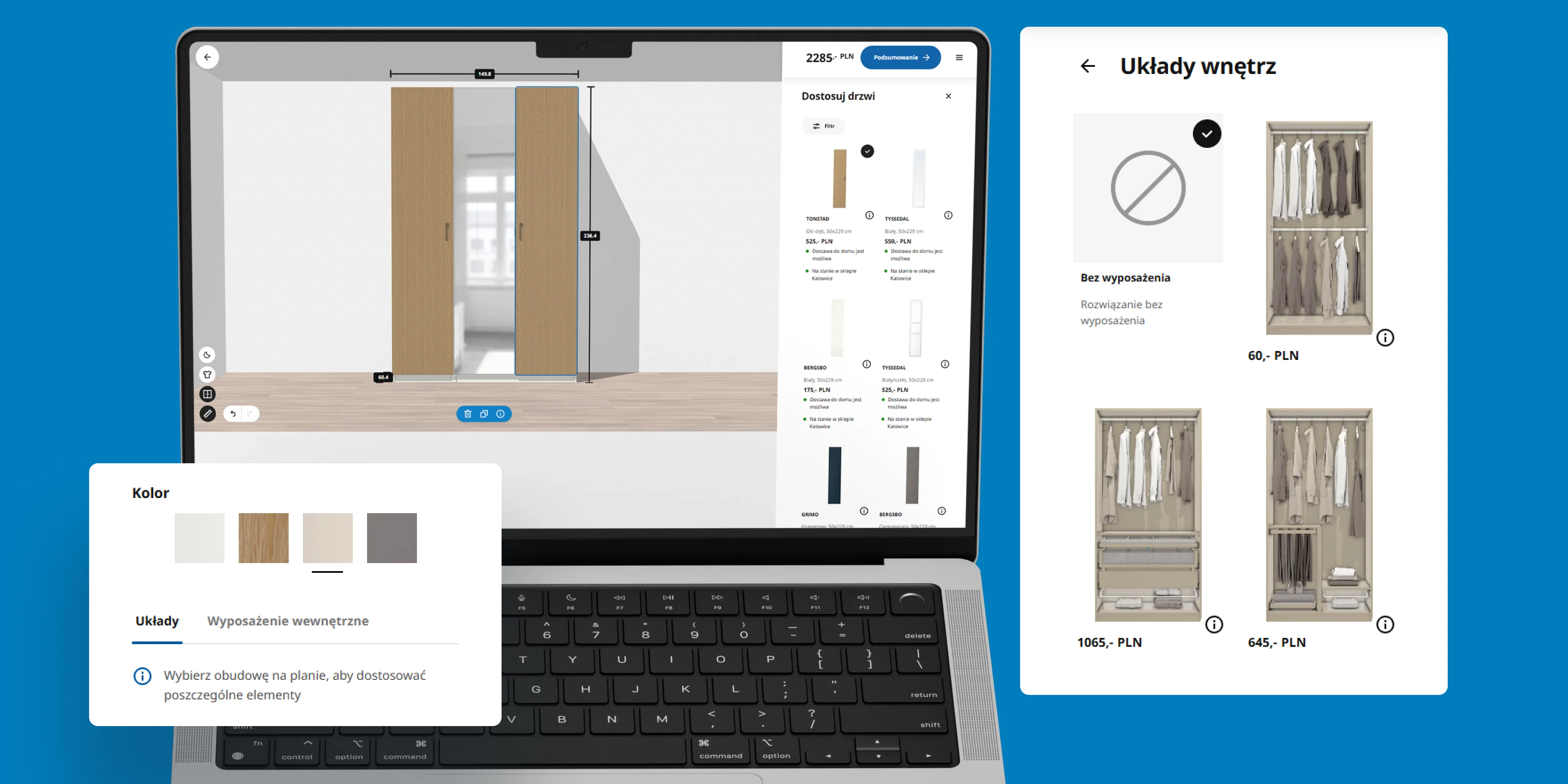
No list would be complete without IKEA’s legendary PAX wardrobe planner. It runs in the browser, so there’s nothing to download, and despite its many options it’s designed to keep things simple and non-intimidating.
When we first reviewed it, you could customise everything: the wardrobe’s frame (including depth and height), doors (hinged or sliding, colour, opening side), handles, interior fittings, add-on accessories (like hanging drawers or storage boxes), and lighting.
The visualisation tools were impressive too — you could change the time of day, hide or show clothes, remove doors for easier editing, view dimensions, and undo/redo actions. Prices for each option appeared in the side panel, with the total at the top, and you could save your design for later via email, QR code, project code or a direct link.
What the best configurators have in common
Looking at the seven tools side by side, the same patterns keep coming back:
- A quick start. vetsak and Optisofa both offer ready-made shapes and a blank canvas, so nobody faces an empty screen.
- The price in view. The configurators on this list show the price as you change options, and most keep the add-to-cart button on screen.
- Help with the fit. AR in your own room (Benet, Optisofa) and fabric or material samples (vetsak, Tylko, Flexmeble) answer the question “will it fit and will I like it?”.
- A way back. Saved designs and shareable links matter for purchases people discuss at home before buying.
- Help for the hesitant. Flexmeble’s remote help and Oakywood’s split between quick choices and a full customiser keep the tool usable for people who aren’t designers.
Why returns make configurators worth it
Furniture is expensive to send back. Mirosław Mikołajczak, CEO of Selsey, a Polish furniture brand we work with, put it plainly on our podcast: “all those returns cost huge amounts of money. Keep in mind that we sell all over Europe.” In the episode, he explains how Selsey cut damage and returns by moving to its own designs, which the team assembles and tests before launch.
A configurator won’t fix product quality or packaging, but it removes another common reason for a return: a piece that doesn’t fit the room or doesn’t look the way the shopper imagined. More about the logistics side in our guide to furniture logistics in e-commerce, and about why furniture brands struggle with loyalty in how to build a furniture brand when customers buy every few years.
How to add a furniture configurator to a Shopify store in 2026
Not every furniture store needs a custom 3D tool. Here is what Shopify offers natively, and where a configurator platform comes in.
- Variants for simple choices. A Shopify product can have up to three options (for example size, fabric and leg colour) and up to 2,048 variants. For many beds, tables and desks, that is enough, with a well-designed variant picker on the product page.
- 3D models and AR without an app. Shopify accepts 3D models as product media in GLB and USDZ formats, up to 500 MB, and automatically optimises files over 15 MB. Shoppers can then view the product in their own space with their phone’s camera, on both iOS and Android. Your theme needs to support 3D media.
- Custom inputs. For details that don’t fit into variants, such as a custom width or a monogram, a theme can collect them as line item properties that travel with the order.
- Modular products and bundles. A sofa made of several modules can be merged into one cart line, or one cart line can be shown as its parts, with the Cart Transform function. Changing a line’s price, title or image with it is limited to Shopify Plus.
- A configurator platform for the full experience. For modular sofas with live 3D, many brands use a specialised platform embedded in the Shopify theme. In our projects, these have included Mimeeq and The Planner Studio (Optisofa) and Precismo (Oakywood), as well as a custom React configurator built with Vazco (vetsak).
One lesson from Optisofa: a 3D configurator doesn’t require a headless store. Optisofa went back from headless to a custom Liquid theme and kept its configurators. If you’re weighing the two, read when a headless Shopify storefront makes sense.
Help Customers Avoid Interior Planning Mistakes
Your customers may not be design experts, but your store can help guide them like one. Many shoppers struggle with selecting pieces that fit the scale and proportion of their space. A configurator helps them see how your products will work in their room before they buy.
From playful modular options like vetsak to iconic planners like IKEA’s wardrobe builder, these tools turn shopping into an interactive journey and make your online store not just a place to buy, but a place to create. For more ideas, see our top home & decor Shopify stores with inspiring UX.
Why furniture brands work with wecanfly
Furniture brands sell large, often configurable products to customers who buy rarely and compare a lot, so the store has to answer the questions a showroom would. wecanfly is a Shopify Premier Partner with 400+ Shopify projects since 2016. For furniture and home brands, we design, build and migrate Shopify and Shopify Plus stores, including product configurators with 3D and AR.
- vetsak: UX/UI and development of a multi-region Shopify Plus store with a 3D product configurator. Case study
- Optisofa: migration from WooCommerce to Shopify, store design and a 3D and AR configurator by Mimeeq; in 2025 we designed the new store on a custom Liquid theme. Case study
- Oakywood: store redesign on Shopify Plus, the OakyBlocks bundler and a product configurator with AR. Case study
- Selsey: we help move Selsey’s large store to Shopify and build stores for new markets on Shopify Plus. Podcast with Selsey’s CEO
Ready to add a configurator to your own store? See how we work with furniture and home brands on Shopify and what our Shopify website design covers, or let’s talk.